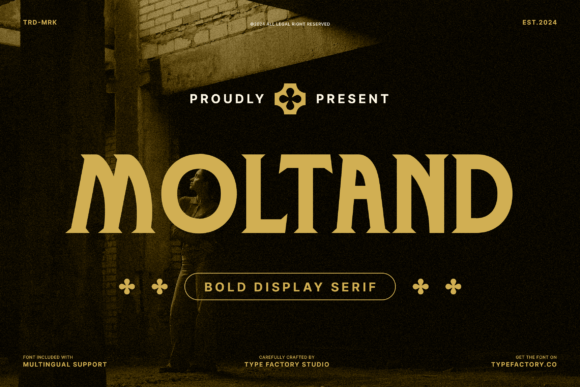
Moltand: A Bold Display Serif for Modern Web Design
I was staring at a blank hero section on a new client’s coaching website, trying to find the right visual anchor. The layout was clean, the imagery was high-quality, but the typography felt flat. It lacked that confident punch needed to stop a scroll. That’s when I pulled up Moltand. As a bold display serif typeface designed for strong typographic presence, it immediately transformed the mood of the page. It wasn’t just about picking a font; it was about establishing authority and elegance in a digital space where attention spans are short.
Testing Moltand in a real-world web project revealed why this Serif is becoming a go-to for designers who want editorial polish without sacrificing modern readability. Unlike many display fonts that feel dated or overly ornate, Moltand combines classic serif structure with amplified weight and confident proportions. This makes it effective for large-scale applications like hero headlines, campaign banners, and brand identity systems. In this article, I’ll walk you through how I integrated this Typeface into a landing page design, what to watch out for regarding responsiveness, and why it might be the missing piece in your digital brand kit.
Moltand for Hero Sections and Landing Page Headlines
When I first dropped Moltand into the H1 tag of our product landing page, the impact was instant. The amplified weight gives the text a physical presence that commands attention. For web designers, the challenge is always balancing visual hierarchy with load times and mobile constraints. Moltand handles this well because its bold strokes are distinct and legible even when scaled down slightly.
In my test, I used Moltand for the primary headline over a dark background image. The contrast was sharp, and the serifs added a layer of sophistication that a standard sans-serif couldn’t achieve. However, I had to be careful with line length. Because Moltand is a display font, it works best in short phrases—typically one to three lines max. If you stretch it across a full paragraph, the rhythm becomes too heavy for comfortable reading. Instead, use it to create a focal point. Pairing it with a lightweight sans-serif for the subheadline created a beautiful tension between bold statement and easy-to-read detail. This combination is perfect for course sales pages or boutique online stores where you need to communicate value quickly and elegantly.
Moltand for Editorial Brand Identity and Blog Headers
Beyond the hero section, I explored using Moltand to strengthen the blog’s editorial voice. Many digital brands struggle to look "premium" because their typography feels generic. By introducing a Serif with character, you signal to readers that the content is curated and thoughtful. I applied Moltand to the blog post titles and category labels. The result was a more cohesive, magazine-like aesthetic that elevated the perceived quality of the content.
One practical tip I learned during this phase is to avoid using Moltand for navigation menus or small interface elements. Its bold nature can clutter a UI if not handled with restraint. Instead, reserve it for areas where you want to draw the eye: section dividers, pull quotes, or featured article headers. When paired with a neutral body font, Moltand allows the content to breathe while maintaining a consistent brand identity. This approach is particularly effective for creative portfolios, fashion blogs, or lifestyle brands that rely heavily on visual storytelling.
Readability and Responsive Behavior of Moltand
A common concern with bold display fonts is how they perform on smaller screens. During my testing, I checked the rendering of Moltand on various devices, from desktop monitors to smartphones. The good news is that its clear letterforms hold up well at smaller sizes, provided you don’t crowd them. On mobile layouts, I reduced the font size significantly and increased the letter spacing (tracking) slightly. This small adjustment prevented the bold serifs from merging visually, ensuring that the text remained crisp and readable.
For fast-loading visual content, Moltand’s straightforward geometry means it doesn’t require excessive file weight compared to more intricate script or handwritten fonts. This is a subtle but important factor for SEO and user experience. Slow-loading fonts can delay the First Contentful Paint, hurting your site’s performance metrics. Moltand strikes a balance between decorative appeal and technical efficiency. Just remember to check the included styles before purchasing; ensure you have the weights you need for both web and print applications. If you’re building a comprehensive brand kit, having access to multiple weights allows for greater flexibility in creating visual hierarchy across different touchpoints.
Moltand for E-commerce Banners and Promotional Graphics
I also tested Moltand in the context of an e-commerce campaign. Online store owners often need promotional banners that stand out in crowded marketplaces. Moltand’s confident proportions make it ideal for sale announcements, new collection headers, and limited-time offer badges. The serif details add a touch of luxury that can justify higher price points in the consumer’s mind.
However, accessibility is key. When placing Moltand over images or colorful backgrounds, I ensured there was sufficient contrast. Using a semi-transparent overlay behind the text helped maintain legibility without obscuring the underlying photography. This technique is essential for social media graphics and digital ads as well. Since Moltand is a commercial font, it’s versatile enough to be used across these diverse platforms, providing consistency from your website to your Instagram posts. Just verify the licensing terms to ensure you’re covered for multi-platform usage, especially if you’re distributing templates or digital products to other creators.
Font Pairing Strategies with Moltand
The success of any typographic system relies on pairing. Moltand is too dominant to stand alone in a complex layout, so choosing the right companion font is crucial. I found that a geometric sans-serif works beautifully alongside Moltand. The clean lines of the sans-serif provide a neutral canvas that lets the serif shine without competition. Alternatively, a humanist sans-serif can soften the overall look, making the design feel more approachable and less formal.
For body copy, stick to highly readable fonts with open apertures and generous x-heights. Avoid pairing Moltand with another serif unless you are highly experienced in editorial design, as two competing serifs can create visual noise. The goal is to create a clear distinction between display text and functional text. By keeping the body copy simple and letting Moltand handle the expressive roles, you create a polished, professional look that guides the user’s eye naturally through the content. This strategy is applicable whether you are designing a SaaS dashboard, a nonprofit campaign page, or a personal brand website.
Why Moltand Fits Modern Digital Workflows
In today’s digital landscape, users expect brands to look polished and intentional. Generic fonts can make a business feel amateurish, no matter how good the product is. Moltand offers a solution that bridges the gap between traditional typographic elegance and modern web aesthetics. Its bold presence ensures that your message is heard, while its classic structure ensures it is respected.
Whether you are redesigning a legacy site or launching a new venture, investing in a premium font like Moltand pays off in brand perception. It signals that you care about the details. As you build your next web project, consider how a strong display Serif can elevate your hierarchy. Test it in your hero sections, experiment with pairing options, and pay close attention to responsive behavior. With the right application, Moltand can transform a standard layout into a memorable digital experience that resonates with your audience and drives engagement.